
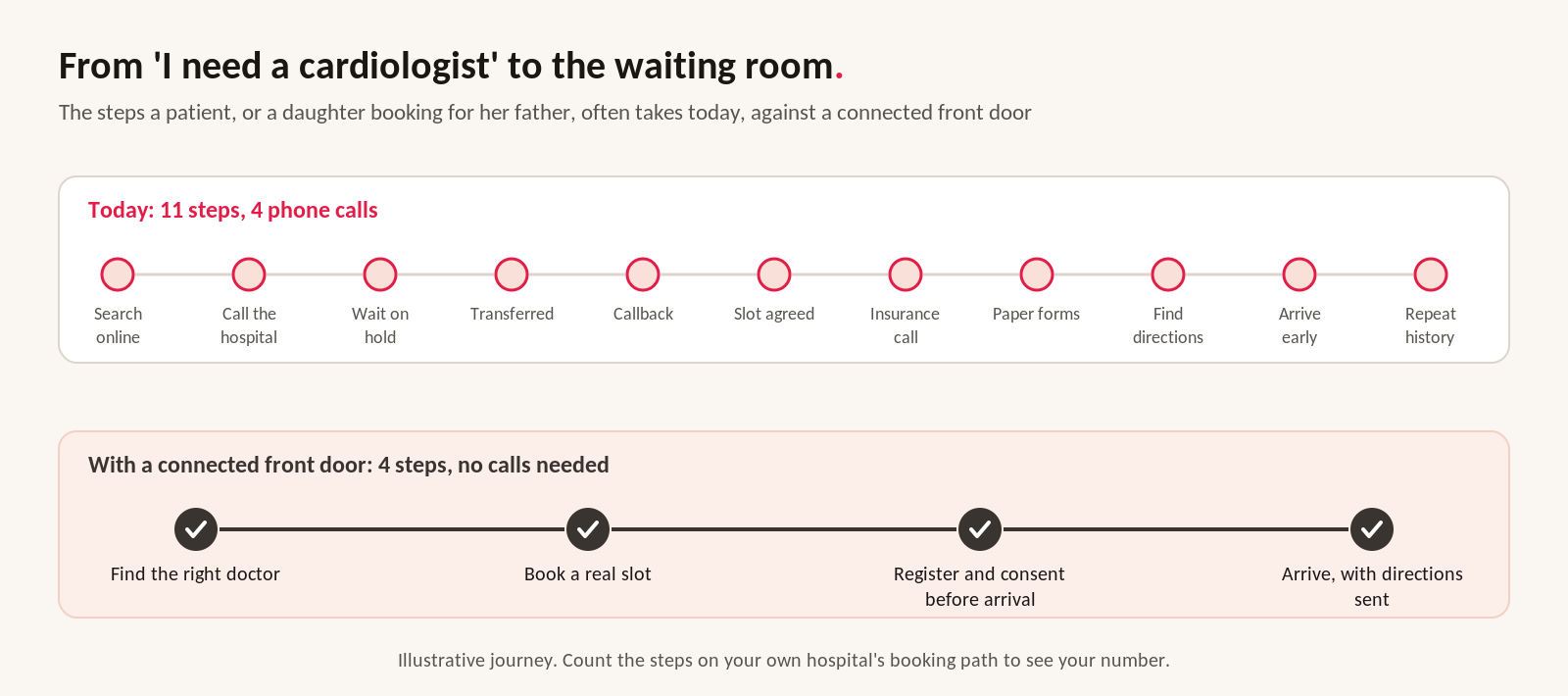
A daughter in Abu Dhabi needs a cardiologist for her father in Dubai. She opens your app on Sunday evening and finds the cardiology page.
There is no slot she can book for him. She calls on Monday, waits on hold, and is asked to bring paper forms on the day.
On the morning of the visit, her father fills in the same details at the desk that she gave on the phone. By the time he sees the doctor, the family has made four calls and taken eleven steps.
Your hospital had an app the whole time. What it lacked was a door.
What Is a Digital Front Door?
A digital front door is the set of online services that take a patient from first question to waiting room. No phone call should be needed. It covers access, booking, digital patient intake and the answers in between.
The phrase describes a job, not a product. Some hospitals deliver it through their own app, some through WhatsApp and the website, and most through a mix.
What matters is that the steps connect. A patient who books online should not give the same details again at registration. A relative booking for a parent should not need the parent's password.
What Are the Components of a Digital Front Door?
A complete digital front door has nine components. Each one removes a reason for the patient to call your contact centre.
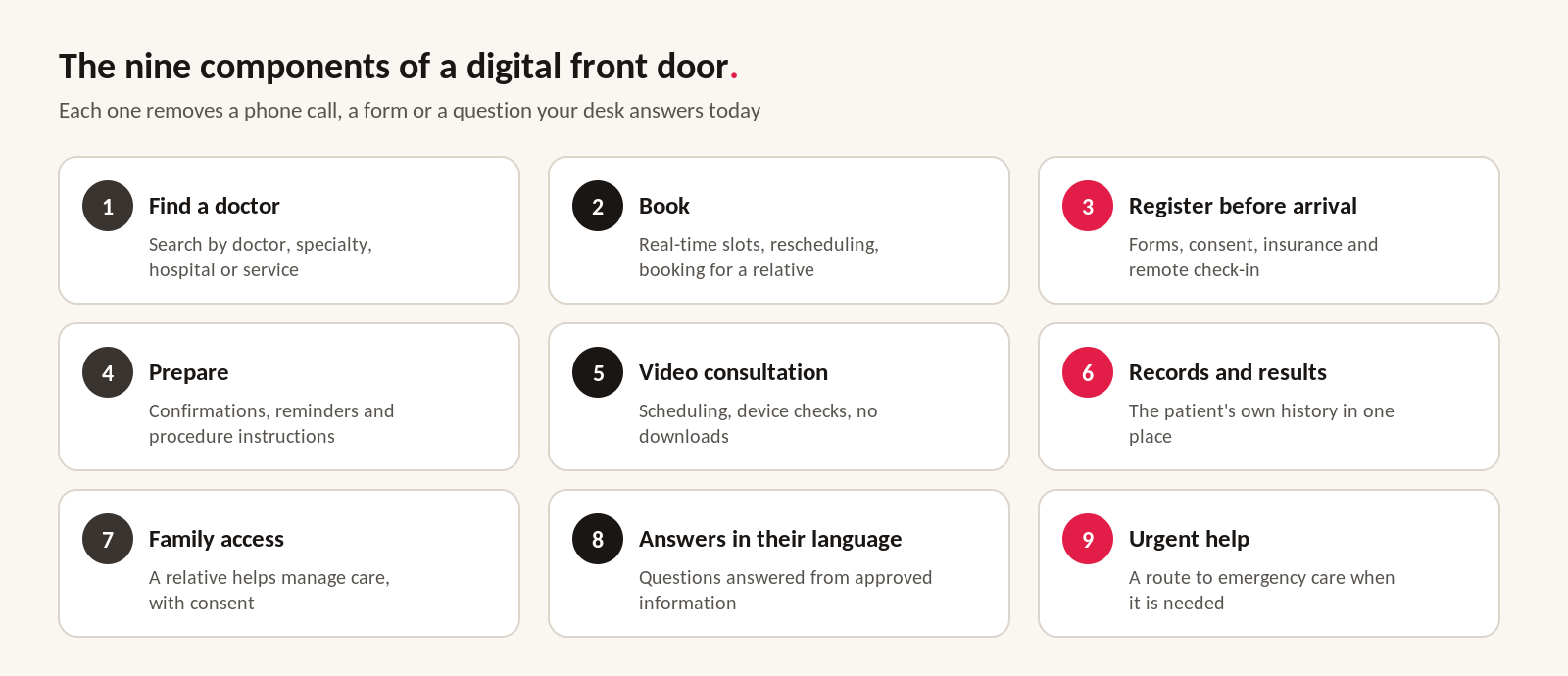
- Find the right doctor. Search by symptom, speciality, language, site and insurance accepted.
- Book in real time. Live slots from your scheduling system, with rescheduling and cancelling online.
- Book for a relative. A family profile, with consent, so a son or daughter can act for a parent.
- Register before arrival. Forms, consent and insurance details completed at home.
- Check in remotely. Patients tell you they have arrived, or are running late, from their phone.
- Prepare for the visit. Fasting, medication and arrival instructions, sent on the right day.
- Get answers in their language. Questions answered from the hospital's approved information, at any hour.
- See a doctor by video. Consultations for follow-ups and questions that do not need a visit.
- Reach emergency help. A clear route to an ambulance or an urgent doctor, without searching menus.
A quick check: which of the following is a component of a digital front door? Online booking, patient intake forms, family access and visit preparation all are. A brochure page with a phone number is not.
Does a Hospital That Already Has an App Need a Digital Front Door?
Yes, if patients still have to call to finish what they start in the app. Most hospital apps were built to show information, so the hard steps still happen on the phone or at the desk.
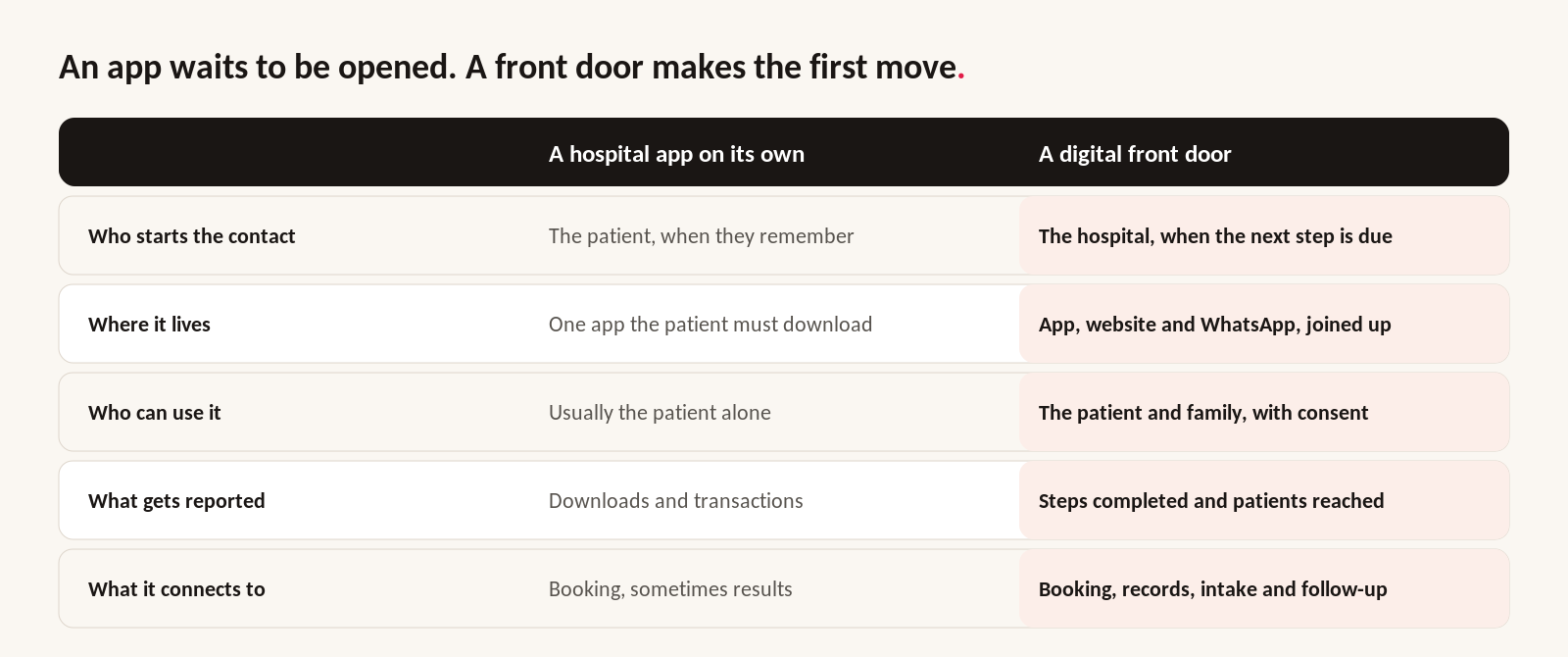
| Question | A typical hospital app | A digital front door |
|---|---|---|
| Can a patient book a real slot? | Shows doctors, then a phone number | Live slots, rescheduling and cancelling |
| Can a relative book for a parent? | Needs the parent's login | Family profile, with the parent's consent |
| Is registration done before arrival? | Paper forms at the desk | Forms, consent and insurance done at home |
| Does the patient get visit instructions? | A leaflet, if at all | Instructions on the day they matter |
| Can patients ask questions at night? | No | Answers from approved information, any hour |
| Does it work on WhatsApp? | App only | App, web, WhatsApp and SMS |
If you answered "phone number" or "no" to three or more of these, you have an app. You can keep it. The door is built around it, so your patients do not lose anything they already use.
There is a cost to waiting. A 2023 survey by RevSpring, a patient communications vendor, found 67% of US patients would consider switching over poor communication before care. In a market where patients can choose, that switch happens before you meet them.
What Does the Journey Look Like Once the Door Is Open?
Go back to the daughter in Abu Dhabi. With a digital front door, her Sunday evening looks different, and it takes four steps.
| Step | What she does | What the hospital does behind it |
|---|---|---|
| Ask | Types "cardiologist for my father, Arabic-speaking, Dubai" on WhatsApp | Matches doctors by speciality, language, site and insurance |
| Book | Picks a Tuesday slot from his family profile | Holds a live slot in the scheduling system and records her consent to act |
| Register | Fills in his forms and insurance details from her phone | Sends the details to registration for review before he arrives |
| Prepare | Receives the instructions the evening before and forwards them to him | Sends arrival, fasting and parking guidance in Arabic, and checks him in on arrival |
Nobody calls the hospital. The desk confirms instead of collecting, and the cardiologist starts on time. Her father arrives knowing where to go.
Notice what did not change. The hospital kept its app, its scheduling system and its EMR. The door connected them around the way this family actually books.
How Do Sehhaty, Sahatna and NABIDH Fit with a Hospital's Digital Front Door?
They sit at different layers, so they work together. National apps give residents one place for their health records and core services. Your digital front door handles what only your hospital can offer.
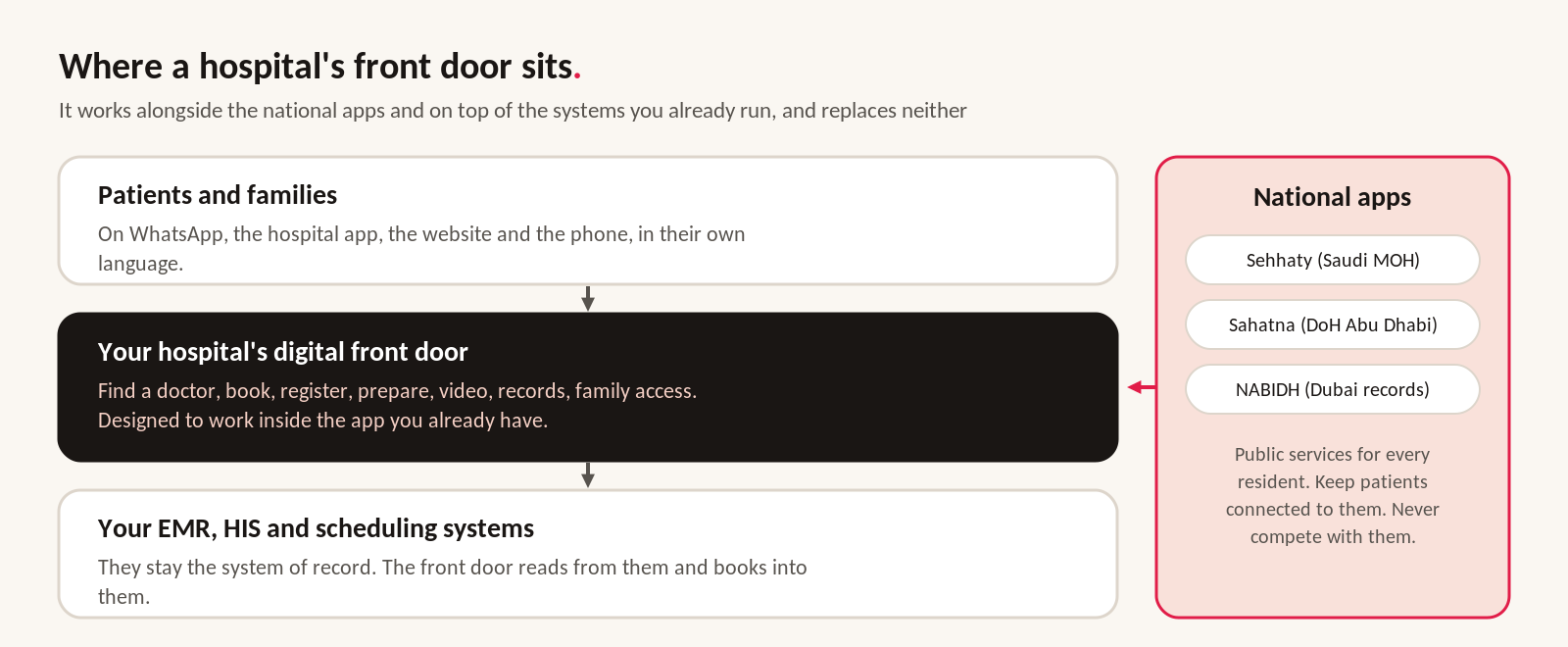
Sehhaty, from the Saudi Ministry of Health (MOH), brings together appointment booking, sick leave, test results and other national services. Third-party trackers report more than 24 million registered accounts.
Sahatna, launched by the Department of Health Abu Dhabi (DoH) in October 2024, offers booking, video consultations, reports and wearable links across Abu Dhabi providers.
NABIDH, the Dubai Health Authority (DHA) health information exchange, shares patient records between licensed facilities in Dubai, with patient consent.
Your hospital's door covers the steps those platforms are not designed to own. That includes your doctors' live slots, your consent forms, your preparation instructions and answers about your services. Many patients will start in a national app and finish with you, so both should point the same way.
This section is general information, not legal advice. Confirm current requirements with your regulator and legal team.
What Are the Benefits of a Digital Front Door?
The benefits land in four places: the patient, the family, the contact centre and the clinic floor. Each one can be measured in a pilot.
Patients book when they decide, not when the phones open. A survey by Phreesia, a patient intake vendor, of more than 4,000 patients found 84% would book online if they could. Fewer than one in three had done so.
Families can help from wherever they live. With about nine in ten UAE residents born abroad, the relative who books is often in another emirate or country. A family profile lets them act without calling.
Your contact centre takes fewer routine calls. Booking changes, directions and "what do I bring" questions move online, so agents spend their time on the calls that need a person.
Clinics start on time. When digital patient intake is done at home, the desk confirms instead of collecting. Patients arrive prepared, and procedure slots are less likely to slip.
How Does AI Improve Patient Access?
AI improves patient access by answering and acting at the moment the patient asks, in their language, within rules your clinicians set. It is designed to handle the repeatable questions so your team can focus on the ones that need judgement.
Answers at Any Hour
A patient asking at 11 p.m. whether to fast before a blood test gets the answer your hospital approved. If the question falls outside approved information, it goes to a person instead.
Routing to the Right Doctor
A patient who types "chest pain when I climb stairs" is guided to cardiology and offered a slot. Anything that sounds urgent is passed to an emergency route, not a booking page.
Arabic, English and More
Answers can be given in the language the patient writes in, using the same approved content. This matters in a region where one hospital may serve patients in a dozen languages.
Intake That Fills Itself
Details a patient has already given are carried forward, so they are not asked twice. Staff review what was captured rather than typing it again.
Cura42's Digital Front Door is designed to work this way, alongside your own app and portal. Confirm with the Cura42 team which features are live for your setting before you plan around them.
What Gets in the Way of a Digital Front Door?
Five things usually slow it down. None of them is a reason to wait, but each one needs an owner before you start.
- Scheduling data that is not live. If slots are updated by hand, online booking will double-book. Start with the clinics whose calendars are already in the system.
- Forms nobody owns. Registration and consent forms often sit with three departments. Agree one version per service line first.
- Insurance rules. Pre-approval steps differ by payer. Show patients what you need from them, and keep the approval itself with your team.
- Fear of the wrong answer. Clinicians worry about what an automated reply might say. Approved instructions and clear escalation rules address this directly.
- One more login. Patients are tired of apps. Meet them on WhatsApp and the web as well, so the door works without a download.
What Should You Ask Before Choosing a Digital Front Door Partner?
Ask questions that test the steps, not the screens. A good demo shows a booking finishing without a call, using your own clinic's calendar.
- Which of the nine components are live today, and in which hospitals? Ask to see each one working, not on a roadmap slide.
- Does it work beside our app, or replace it? Replacing what patients already use resets adoption to zero.
- How does it connect to our scheduling system and EMR? Ask what your IT team must provide, and how long each connection takes.
- Where is patient data stored and processed? In the UAE and Saudi Arabia, the answer must match your data residency rules.
- Who approves what it says to patients? Your clinicians should own the instructions and the escalation rules.
- What will the first report measure? If the answer is downloads, ask again. You want steps, calls and bookings.
How Do You Plan a Digital Front Door Strategy in 60 Days?
Plan it in four short phases around one service line. You will learn more from one working door than from a group-wide design document.
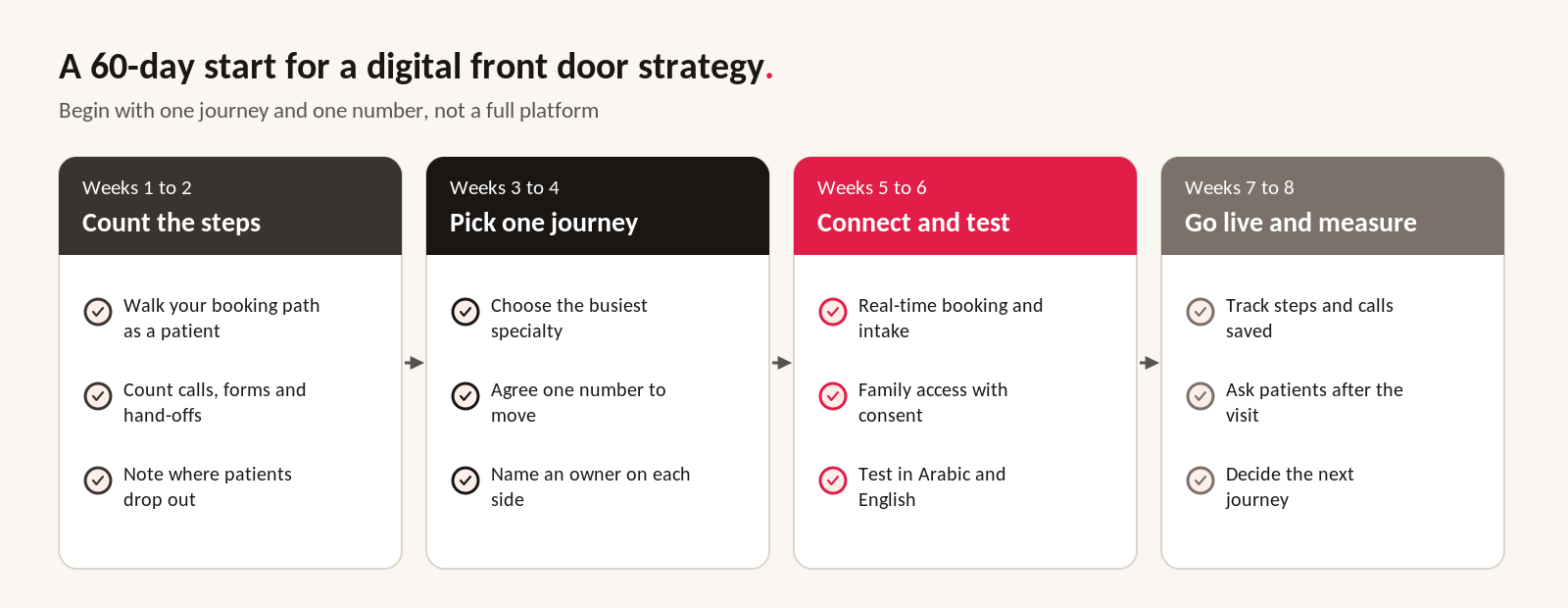
- Days 1 to 10: count. Walk one journey as a patient and as a relative. Count every step and every call from first question to waiting room.
- Days 11 to 25: choose. Pick the three components that remove the most calls. For most groups that is live booking, family access and pre-arrival registration.
- Days 26 to 45: connect. Link those components to your scheduling system and your electronic medical record (EMR), and agree approved answers with your clinical lead.
- Days 46 to 60: open and measure. Switch on for that service line and report steps, calls and online bookings against the count from day one.
The measure that matters most is the first one you took. If the journey drops from eleven steps and four calls to four steps and none, the door is working.
How Do You Measure a Digital Front Door?
Measure what the door removes: steps, calls and empty slots. App downloads say little about whether patients got through.
- Steps and calls per booking. The count you took on day one, repeated each month for the same journey.
- Share of bookings made online. Include bookings made by relatives through family profiles.
- Registration completed before arrival. The share of patients whose forms and insurance are done at home.
- Routine calls to the contact centre. Booking changes, directions and preparation questions, tracked by reason.
- Questions passed to a person. How many automated conversations ended with a staff member, and how fast they replied.
- Late starts and no-shows. For the service line you opened, compared with the months before.
Take each baseline before you switch anything on. If you cannot find a number today, that gap is worth fixing first, because you will need it to show the board a result.